MCP Has a Tools Problem — And Code Mode Might Fix It
You’ve seen the pitch. Connect your AI agent to everything — GitHub, Slack, your database, your cloud provider — via MCP. Each new tool makes your agent more capable. More connections, more power.
Except that’s not what happens. The more tools you give an agent, the worse it actually gets.
I’ve been watching this play out in real time, and it’s becoming one of the most important problems in the AI tooling space right now.
More Tools = Worse Performance
Here’s the thing most people don’t realize about how AI agents work with tools. Every single tool you connect comes with a description — what it does, what parameters it accepts, what it returns. That description gets stuffed into the model’s context window alongside your actual prompt.
One tool? No big deal. Ten tools? Still manageable. But what happens when you connect a large API?
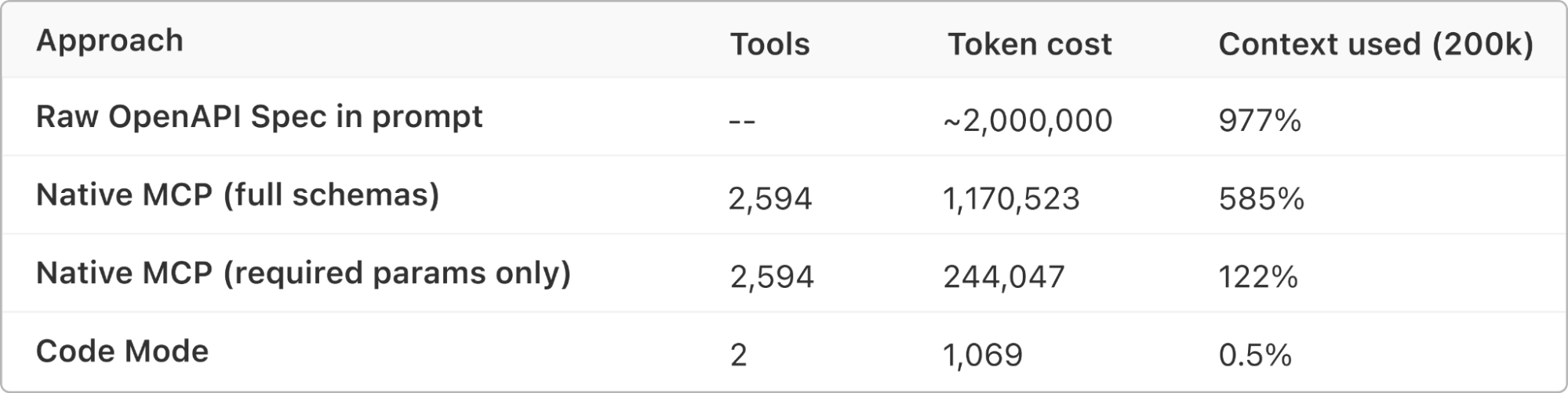
Cloudflare recently shared some eye-opening numbers. Their API has around 2,500 endpoints. Converting all of those into MCP tool definitions would consume roughly 1.17 million tokens — just for the tool descriptions alone. That’s more than most models can even hold in their entire context window. Your actual question hasn’t even been asked yet, and the model is already full.
But it’s not just about token limits. Even if you had infinite context, there’s a deeper problem: decision paralysis. When an agent sees 50 tools, it has to reason about which one to pick. At 500 tools, that reasoning becomes unreliable. At 2,500, it’s basically guessing.
Think of it this way. If someone hands you a toolbox with 10 well-labeled drawers, you can find what you need quickly. Now imagine a warehouse with 2,500 unlabeled drawers. You’d spend all your time searching and almost none of it working. That’s what we’re doing to our AI agents.
Why This Matters Right Now
MCP adoption is accelerating fast. Every week there’s a new server, a new integration, a new way to connect your agent to some service. And developers are doing exactly what you’d expect — connecting everything they can.
We’re about to hit a wall. The current model of “one API endpoint = one MCP tool” simply doesn’t scale. And the agents that seem impressive in demos with 5-10 tools start falling apart in production when they’re wired into an entire organization’s infrastructure.
This isn’t a theoretical problem. It’s happening now.
The Approaches Being Tried
The community has been exploring a few different strategies to deal with this, and they’re worth understanding.
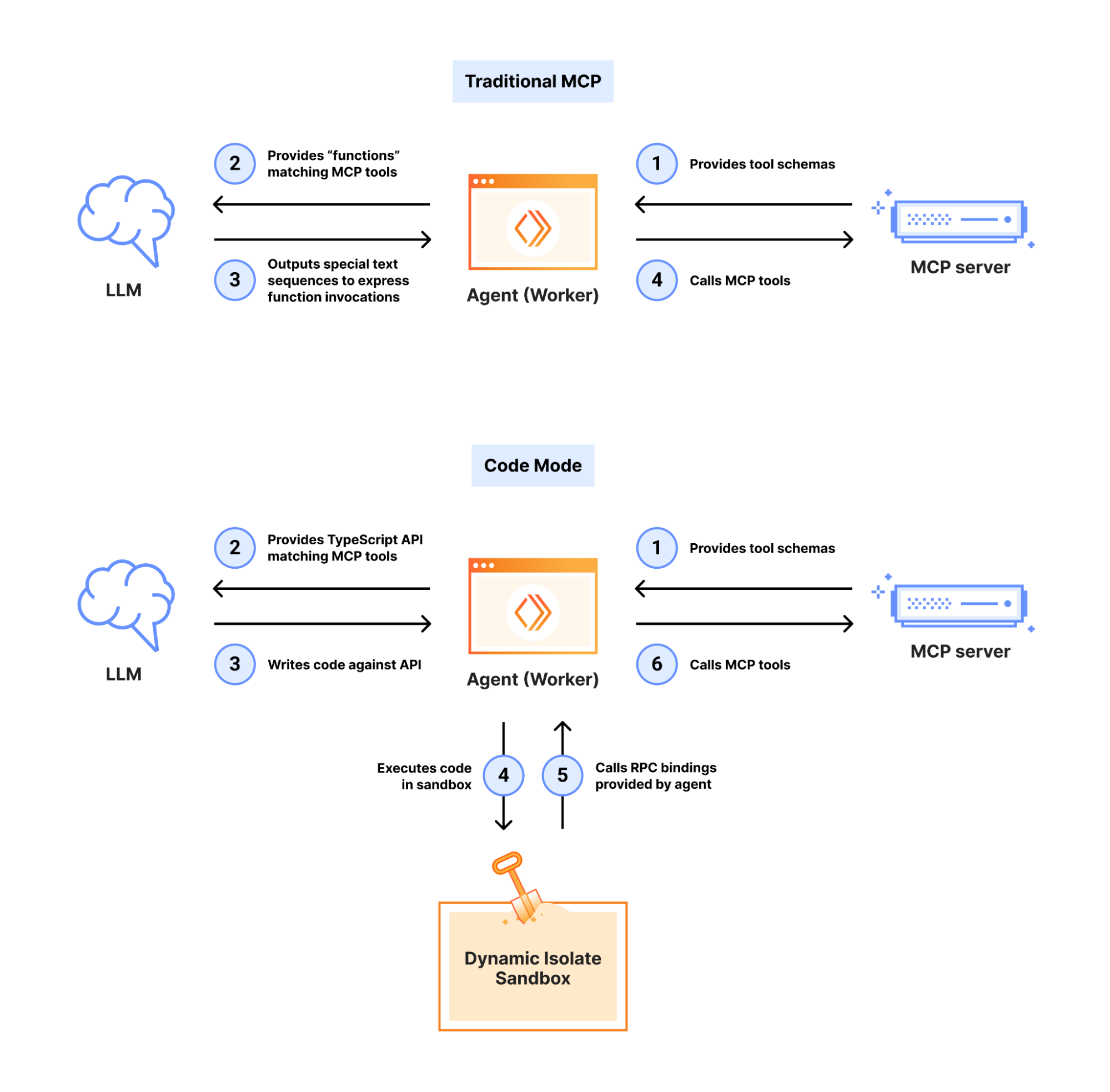
Dynamic tool search is the first approach. Instead of loading all tools into the context upfront, the agent searches for relevant tools on the fly. It helps with token limits, but doesn’t fully solve the decision problem — the agent still needs to pick the right tool from search results and figure out how to use it.
Client-side code execution is the second approach. Instead of calling tools, the agent writes code against an SDK locally. This works, but introduces sandboxing headaches and dependency management. You’re essentially asking the agent to be a programmer instead of a tool user.
Server-side Code Mode is the third, and in my opinion, the most elegant. This is what Cloudflare recently built, and it fundamentally rethinks the tool-per-endpoint model.
Code Mode: The Elegant Fix
Here’s the idea behind Code Mode, and it’s beautifully simple.
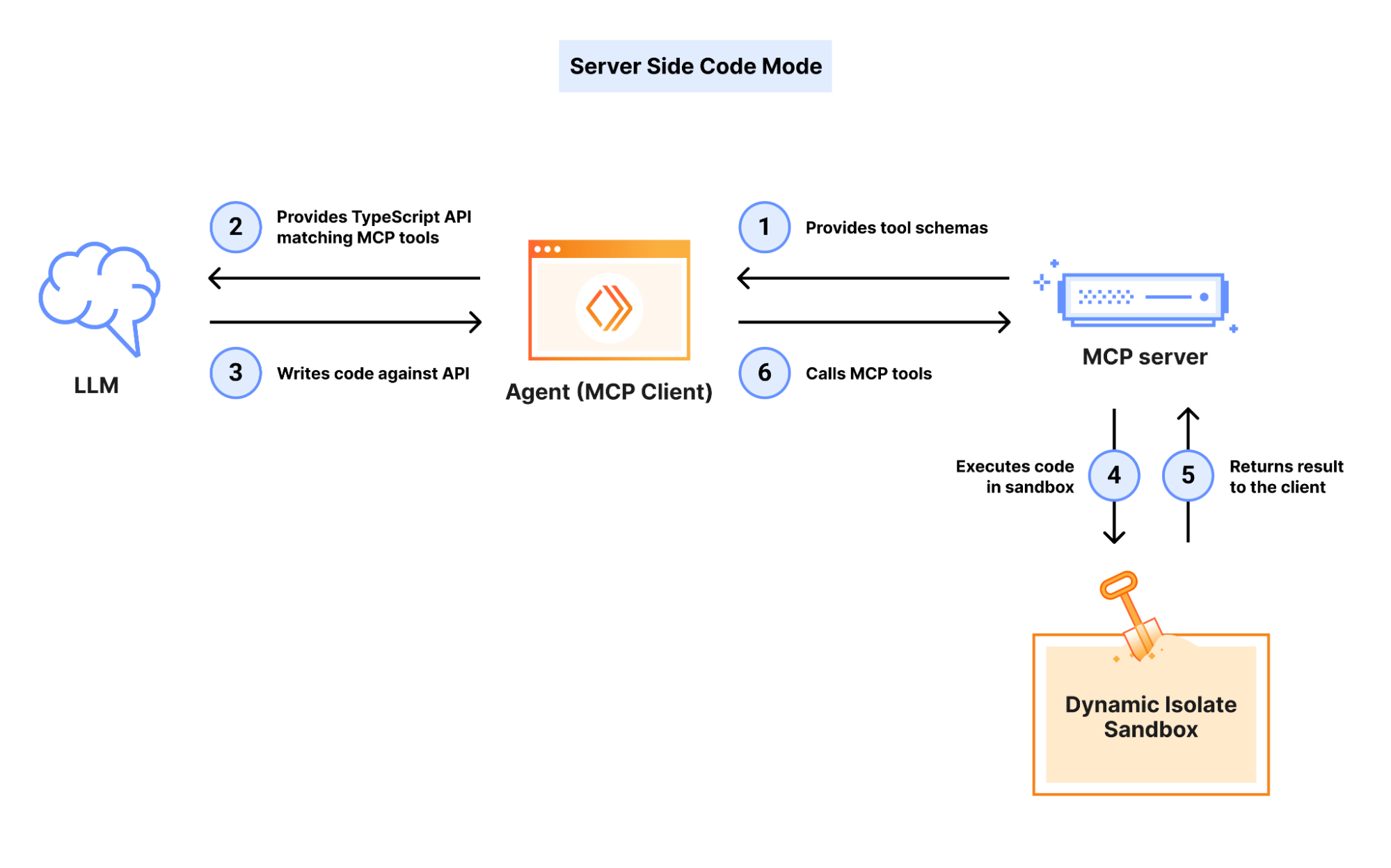
Instead of exposing 2,500 individual tools, the MCP server exposes just two: search and execute. The agent uses search to find the right API endpoint from documentation. Then it writes a small code snippet and passes it to execute, which runs it server-side with full authentication already handled.
Here’s what the entire tool surface looks like — this is everything that gets loaded into the model’s context:
[
  {
    "name": "search",
    "description": "Search the Cloudflare OpenAPI spec. All $refs are pre-resolved inline.",
    "inputSchema": {
      "type": "object",
      "properties": {
        "code": {
          "type": "string",
          "description": "JavaScript async arrow function to search the OpenAPI spec"
        }
      },
      "required": ["code"]
    }
  },
  {
    "name": "execute",
    "description": "Execute JavaScript code against the Cloudflare API.",
    "inputSchema": {
      "type": "object",
      "properties": {
        "code": {
          "type": "string",
          "description": "JavaScript async arrow function to execute"
        }
      },
      "required": ["code"]
    }
  }
]
That’s it. Two tools. Around 1,000 tokens. And it covers 2,500+ API endpoints.
The result? Token cost stays fixed regardless of how large the API is. Whether the underlying API has 50 endpoints or 50,000, the agent always sees the same two tools. The complexity is hidden behind the server, exactly where it should be.
How Search Works
When the agent needs to discover what’s possible, it calls search with JavaScript that runs against the full OpenAPI spec. For example, to find WAF and firewall endpoints:
async () => {
  const results = [];
  for (const [path, methods] of Object.entries(spec.paths)) {
    if (
      path.includes("/zones/") &&
      (path.includes("firewall/waf") || path.includes("rulesets"))
    ) {
      for (const [method, op] of Object.entries(methods)) {
        results.push({ method: method.toUpperCase(), path, summary: op.summary });
      }
    }
  }
  return results;
};
The server runs this in a sandboxed isolate and returns just the matching endpoints — the full spec never enters the model context.
How Execute Works
Once the agent knows which endpoints to hit, it switches to execute. The sandbox provides an authenticated cloudflare.request() client, so the agent can chain multiple API calls in a single execution:
async () => {
  // Get current DDoS L7 entrypoint ruleset
  const ddos = await cloudflare.request({
    method: "GET",
    path: `/zones/${zoneId}/rulesets/phases/ddos_l7/entrypoint`,
  });

  // Get the WAF managed ruleset
  const waf = await cloudflare.request({
    method: "GET",
    path: `/zones/${zoneId}/rulesets/phases/http_request_firewall_managed/entrypoint`,
  });

  return { ddos: ddos.result, waf: waf.result };
};
From searching the spec to inspecting schemas to making authenticated API calls — all handled in just a few tool invocations. No context window bloat. No decision paralysis.
It’s a shift in philosophy. Instead of trying to describe every possible action upfront, you give the agent the ability to discover and compose actions on the fly. The agent becomes a programmer working against a well-documented API rather than a user staring at thousands of buttons.
Cloudflare reported that this approach handles their entire API surface — all 2,500 endpoints — with the same two-tool interface. No context window explosions. No decision paralysis. Just search, write, execute.
What This Means for the MCP Ecosystem
I think this is a preview of where the entire MCP ecosystem is heading.
The servers that win won’t be the ones that expose the most tools. They’ll be the ones that expose the smartest interfaces — minimal tool surfaces backed by rich, searchable documentation and flexible execution.
If you’re building an MCP server today, think carefully about your tool count. Every tool you add is a tax on every agent that connects to you. Maybe the answer isn’t another 20 tool definitions. Maybe it’s a search endpoint, good documentation, and a run endpoint.
The broader lesson here extends beyond MCP. The best interfaces aren’t the ones that expose everything — they’re the ones that make the right thing easy to find and easy to do. That’s true for human interfaces, and it turns out it’s true for AI interfaces too.
The Future Isn’t More Tools
We got excited about connecting everything. That was the right instinct — agents should be able to interact with the world. But the current approach of one-tool-per-action is a dead end at scale.
The future is smarter access patterns. Search instead of enumerate. Compose instead of select. Let the agent think in code instead of forcing it to pick from a menu.
MCP is still early, and the ecosystem is figuring this out in real time. But the direction is clear: fewer tools, more capability.