Context Engineering: The Discipline That Makes AI Agents Actually Work
In June 2025, Andrej Karpathy posted something that crystallized what agent builders had been learning the hard way:
“I would like to mass-replace ‘prompt engineering’ with ‘context engineering’. It’s not just about the prompt (the user-facing text). It’s about filling the context window — the entire text input to the LLM — with just the right information needed for the next step.”
This wasn’t a branding exercise. It was a recognition that the biggest bottleneck in building reliable AI agents isn’t the model — it’s what you put in front of it.
From Prompt Engineering to Context Engineering
Prompt engineering is about crafting the instruction: “You are a helpful assistant. Do X in Y format.” That’s one piece of text.
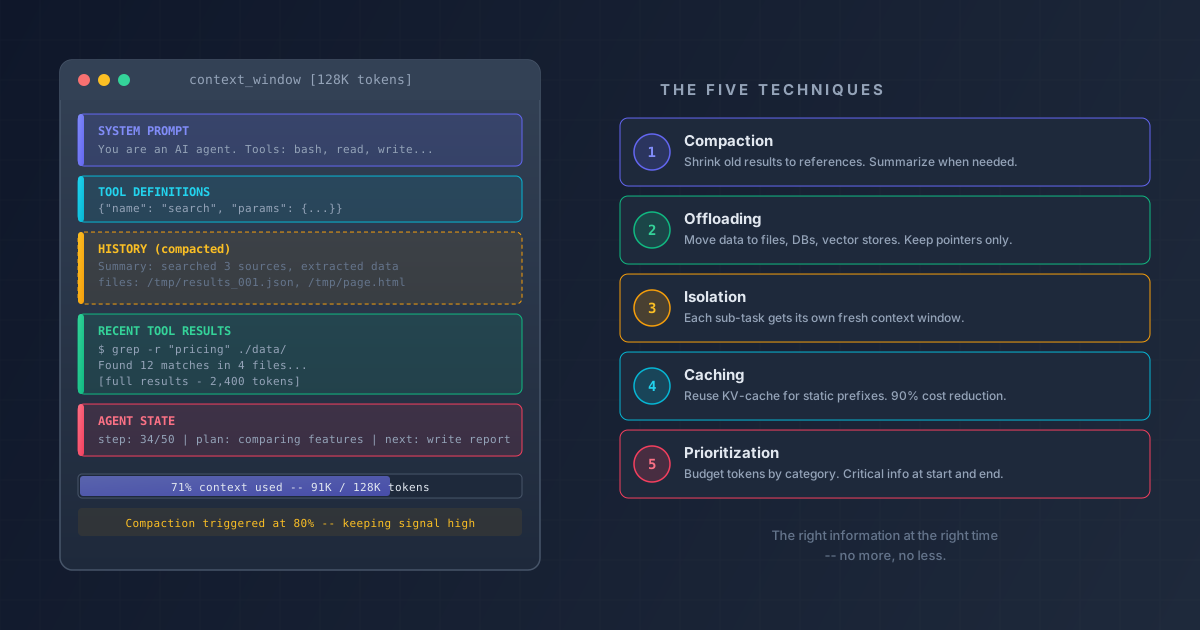
Context engineering is about managing everything that goes into the context window: the system prompt, conversation history, tool definitions, tool results, retrieved documents, and agent state. For an agent making 50 tool calls, the prompt itself is less than 5% of the context. The other 95% is accumulated tool results and history that nobody explicitly wrote — it just piled up.
The distinction matters because:
- Prompt engineering is static: you write it once, maybe iterate on wording
- Context engineering is dynamic: the context changes every turn, growing and shifting as the agent works
- Prompt engineering is about one interaction with a human
- Context engineering is about an autonomous system making dozens of sequential decisions
When you chat with an LLM, you are the context engineer — you decide what to include in your message, what background to provide, when to start a new conversation. When an agent runs autonomously for 50+ steps, there is no human curator. The system must manage its own context or drown in it.
Why Context Matters More for Agents
A chatbot has a simple context lifecycle: human writes message, model responds, human writes again. The human naturally keeps context manageable — short messages, relevant questions, starting new conversations when topics change.
An agent is different. It runs in a loop:
- Decide what tool to call
- Call the tool
- Read the result
- Decide what to do next
- Repeat until done
Each cycle adds tool results to the context window. Manus (one of the most widely-used consumer AI agents) averages about 50 tool calls per task. Claude Code auto-compresses after the context grows too large. Devin runs multi-hour coding sessions with hundreds of steps.
The context window is the agent’s entire world model for each decision. Everything it knows, everything it can reason about, must be in that window. It’s like working memory in the human brain — finite, precious, and absolutely critical for the quality of each decision.
The Problem: Context Degrades Performance
Here’s the counterintuitive part: more context makes agents worse, not better.
The “Lost in the Middle” Effect
Liu et al. (2023) demonstrated something alarming in their paper “Lost in the Middle: How Language Models Use Long Contexts.” When they placed a relevant document among 20 documents and moved it to different positions:
- At the beginning: ~80% accuracy
- In the middle (position 10 of 20): ~55% accuracy
- At the end: ~72% accuracy
That’s a 25 percentage point drop just from changing where information sits in the context. Even models explicitly trained for long contexts showed this U-shaped curve. The model’s attention is strongest at the beginning and end, weakest in the middle.
For agents, this is devastating. After 30 tool calls, your critical early instructions and recent results are fine — but everything in between? The model is half-blind to it.
Context Rot
Chroma’s research coined the term “context rot” — the progressive degradation of model performance as context fills up, regardless of where information is placed. Their findings:
- Performance degrades well before hitting token limits
- At 50-70% of context capacity, measurable degradation is already occurring
- Providing 2x the necessary context can reduce accuracy by 10-20%
- The degradation is roughly logarithmic — the first doubling hurts most
This isn’t just about fitting within limits. Adding irrelevant or stale information actively harms the model’s ability to use the relevant information. Every unnecessary token depletes the model’s finite attention budget.
The Cost Problem
Context isn’t just a quality issue — it’s a cost and latency issue. Attention in standard transformers is O(n^2) in sequence length. Doubling the context quadruples the computation in the attention layers. For a 50-step agent session, this compounds quickly:
- More tokens per request = higher cost per API call
- More tokens = more latency per response
- More latency per step * 50 steps = a task that takes minutes instead of seconds
The Five Core Techniques
Production agents use five techniques to manage context. They’re not alternatives — they’re complementary tools that work together.
1. Context Compaction: Shrink What’s Old
Compaction is the highest-ROI optimization because it addresses the most common problem: tool results piling up.
How it works: Every tool result has two representations — a full version and a compact version. When a tool is called, the full result goes into context. As newer results arrive, older results are swapped to their compact form (typically just a file path reference).
Here’s what this looks like in practice with Manus:
Turn 1: Search web → [full search results, 2000 tokens]
Turn 2: Read page → [full page content, 3000 tokens]
Turn 3: Extract data → [full extraction, 1000 tokens]
...
Turn 20: The context now holds:
  - Turn 1: "Search results saved to /tmp/search_001.json" (20 tokens)
  - Turn 2: "Page content saved to /tmp/page_001.html" (20 tokens)
  - Turn 3: "Extraction saved to /tmp/extract_001.json" (20 tokens)
  ...
  - Turn 18-20: [full results, still needed for next decision]
The agent can always fetch old results back from the filesystem if needed, but they’re not consuming context space. It’s like clearing your desk by filing papers — still accessible, but not cluttering your workspace.
When compaction isn’t enough: If most results are already compacted and context is still too large, agents apply schema-based summarization — taking the entire action history and compressing it into a structured summary:
{
  "task": "Research and compile pricing data",
  "completed_steps": ["searched 3 sources", "extracted pricing tables", "normalized formats"],
  "key_findings": ["Product A: $50/mo", "Product B: $75/mo"],
  "current_state": "comparing features",
  "files_created": ["/tmp/pricing_comparison.csv"]
}
Same information density, a fraction of the tokens.
Real implementations:
- Manus: Dual full/compact representations, schema-based trajectory summarization
- Claude Code: Auto-compaction when context fills, plus a manual
/compactcommand - Anthropic’s context editing: Automatically clears stale tool calls and results while preserving conversation flow
2. Context Offloading: Move Data Out of the Window
If compaction shrinks data in-window, offloading moves it out entirely. The context window becomes a pointer to external storage rather than the storage itself.
The filesystem as memory. The most effective pattern across production agents is stunningly simple: write things to files. Plans go in plan.md. State goes in state.json. Intermediate results go in temp files. The agent keeps only pointers in its context and reads files back when needed.
Manus’s co-founder Peak Ji captured this philosophy: the agent uses fewer than 20 atomic tools (bash, file read/write, code execution). Rather than binding hundreds of specialized tools — which would bloat context with tool schemas and confuse the model — most actions are pushed to the sandbox layer. MCP tools are exposed via CLI and executed through the bash tool.
Why fewer tools matters. Every tool definition consumes context tokens. An agent with 200 tools might spend 15,000+ tokens just on tool schemas before any work begins. Anthropic’s documentation warns: “Tool descriptions use valuable tokens and many (often overlapping or ambiguous) tools can cause model confusion.”
RAG as offloading. Retrieval-augmented generation is a form of context offloading — instead of keeping an entire knowledge base in context, you store it in a vector database and retrieve only the relevant chunks. Anthropic’s Contextual Retrieval technique reduced retrieval failure rates by 49% (from 5.7% to 1.9%) by prepending each chunk with context about where it fits in the larger document.
Real implementations:
- Claude Code: CLAUDE.md files as persistent pre-loaded context, selective file reading (specific line ranges, not entire files), grep/glob for discovery before reading
- Devin: Full VM workspace with plan.md, notes.txt, and scratchpad files as external memory
- Manus: Sandbox filesystem for all tool results, <20 atomic tools to minimize schema bloat
3. Context Isolation: Separate Concerns into Separate Windows
Each agent task or subtask gets its own context window. This prevents cross-contamination — one task’s noise doesn’t pollute another’s focus.
Why this matters: Manus’s team learned this the hard way. They initially used a todo.md file for task planning and found that roughly one-third of all agent actions were spent updating the todo list. That’s a massive waste of tokens and compute. They shifted to a planner-executor architecture where:
- A planner agent holds the high-level strategy and dispatches tasks
- Executor sub-agents each get their own clean context window with only what they need
- A knowledge manager reviews conversations and decides what to persist to the filesystem
The key insight from the Manus team: sub-agents exist primarily to get fresh context windows, not to mimic human organizational roles. You’re not creating a “designer agent” and “engineer agent” because LLMs benefit from role-playing — you’re creating them because each task needs focused context.
Two modes of context sharing:
- Simple tasks: The planner passes just the instructions. The sub-agent works in total isolation, returns structured results. Minimal context needed.
- Complex tasks: The planner shares its full context with the sub-agent. The sub-agent gets the complete trajectory plus its own tools.
Real implementations:
- Manus: Planner + knowledge manager + executor architecture, constrained decoding for sub-agent output schemas
- Claude Code:
tasktool spawns sub-agents with their own context windows - OpenAI Agents SDK: Handoffs between specialized agents, each with its own system prompt and tools
- LangGraph: State graphs where each node processes its own context
4. Context Caching: Reuse What You’ve Already Computed
Every turn in an agent session sends the system prompt, tool definitions, and conversation history to the model. Without caching, a 20,000-token system prompt sent 50 times costs 1 million input tokens. With caching, the economics change dramatically.
Anthropic’s prompt caching:
| Aspect | Cost |
|---|---|
| Cache write (first time) | 25% premium over base |
| Cache read (subsequent) | 90% discount |
| Latency reduction | Up to 85% on cache hits |
| Cache TTL | 5 minutes (refreshed on hit) |
For an agent making 50 calls with a 20K-token system prompt: without caching, that’s 1M input tokens. With caching, it’s roughly 123K equivalent tokens — an 88% cost reduction.
OpenAI’s approach is automatic (no explicit cache markers), with a 50% discount on cached tokens and up to 80% latency reduction.
Why this matters for agent design: Caching makes large, detailed system prompts economically viable. You can afford to front-load comprehensive instructions, tool definitions, and project context on every turn without the cost penalty. This is especially valuable because system prompt tokens sit at the beginning of the context — exactly where the model’s attention is strongest.
Cache-friendly context design: Manus designs its context to be append-only (adding new messages at the end, never rewriting earlier parts). This maximizes prefix cache hits because the KV-cache stores key/value attention projections left-to-right. If the prefix remains unchanged across turns, all those projections can be reused.
5. Context Prioritization: Put the Right Info in the Right Place
Not all context is equally important, and not all positions in the context are equally attended to. Prioritization means being intentional about both.
Token budgeting. Production agents allocate their context window like a budget:
System prompt + instructions:  15-20%
Structured state (plan, goals): 10-15%
Recent conversation history:    30-40%
Current tool results:           20-30%
Reserved for model output:      10-15%
When the budget is exceeded, the lowest-priority content is dropped or summarized first. The priority ordering (from most to least critical):
- System prompt — always present, highest signal
- Current user request — the actual task
- Recent tool results — needed for the next decision
- Recent assistant messages — continuity of reasoning
- Older conversation history — background context
- Older tool results — first to be compacted or dropped
Positional strategy. Given the “Lost in the Middle” effect, smart agents place critical information at the start (system prompt, key instructions) and end (recent results, current state) of the context. Less critical information goes in the middle where attention is weakest.
Real implementations:
- LangChain:
ConversationTokenBufferMemoryenforces token limits by dropping oldest messages;trim_messagesutility with configurable strategy - Aider: Repository maps compress entire codebases from 200K+ tokens to 2-8K tokens while maintaining ~95% accuracy — a 25-100x compression ratio
- Top SWE-bench agents: Use only 20K-60K tokens per problem, not the full available window — deliberately less context for better results
State Machines for Agent Control Flow
Raw agent loops (think → act → observe → repeat) work for demos but fall apart in production. The problem: there’s no structure for when to compact, when to switch strategies, or when to recover from errors.
Production agents use state machines to define explicit phases:
[PLAN] → [EXECUTE] → [EVALUATE] → [PLAN] (if more work)
   ↓                      ↓              ↓
[STUCK]              [COMPACT]       [COMPLETE]
(recovery)    (context too large)   (task done)
Each state loads different context:
- PLAN state: high-level goals, completed steps, available resources
- EXECUTE state: current step details, relevant files, tool definitions
- EVALUATE state: expected outcomes, test results, acceptance criteria
- COMPACT state: full trajectory for summarization
Manus uses a planner that functions as a state machine — deciding whether to execute, delegate, summarize, or finish based on the current state. Different states have different available tools and context, which naturally prevents bloat.
The OpenAI Agents SDK models this with explicit handoffs — each agent is essentially a state with its own system prompt, tools, and transition rules. LangGraph makes state machines a first-class concept with typed state graphs, conditional edges, and checkpointing at every node.
Why this matters for context engineering: State machines create natural compaction points. When transitioning from EXECUTE to EVALUATE, you can summarize the execution details. When transitioning from EVALUATE back to PLAN, you can drop tool results and keep only outcomes. The state machine makes context management systematic rather than ad-hoc.
How Production Agents Do It
Manus
Manus combines all three core strategies — compaction, offloading, and isolation — with task-level model routing across Claude, Gemini, and OpenAI based on task type and cost. They use fewer than 20 atomic tools, a planner/executor multi-agent architecture, and constrained decoding for structured sub-agent outputs. They’ve refactored their architecture 5 times since launching in March 2025.
Claude Code
Claude Code takes a deliberately simple approach, influenced by the Bitter Lesson: a single-agent loop with sub-agent spawning via the task tool. Context management happens through auto-compaction (summarizing conversation when context fills), CLAUDE.md files for persistent project knowledge, selective file reading (line ranges instead of full files), and Anthropic’s prompt caching. The philosophy is to keep the harness simple and let model improvements drive capability gains.
Devin
Devin operates in a full VM with browser, editor, and terminal. It uses a planning-first approach where the plan document serves as compressed intent that persists across context resets. Intermediate reasoning goes to scratchpad files, and completed phases are summarized into checkpoints. The team advocates for a single well-managed agent over complex multi-agent architectures.
LangGraph
LangGraph provides the most explicit state management primitives: typed state graphs, a trim_messages utility, a Store API for persistent semantic memory, and checkpointing at every node for recovery and replay. It makes context engineering a first-class concern rather than an afterthought.
Practical Guide: Building Context-Aware Agents
If you’re building agents, here are the principles that matter most:
1. Treat context as a precious resource, not a dumping ground. Every token you add competes for the model’s attention. More context with lower relevance consistently loses to less context with higher relevance. The best agents are context-minimizing, not context-maximizing.
2. Separate working memory from long-term memory. The context window is working memory — use it for active reasoning about the current step. Everything else (plans, past results, reference docs) belongs in external storage (files, databases, vector stores) and gets loaded only when needed.
3. Implement compaction early. It’s the highest-ROI optimization. If your agent makes more than 10 tool calls per task, you need compaction. Swap old results for references, summarize trajectories when compaction isn’t enough.
4. Use caching for cost, prioritization for quality. Prompt caching makes large system prompts nearly free. Token prioritization ensures the model sees the most important information in the positions where its attention is strongest.
5. Test with realistic task lengths. An agent that works great for 5-step tasks might fall apart at 30 steps. Context degradation is non-linear — it holds steady for a while, then drops sharply. Your tests need to find that cliff before your users do.
Key Takeaways
Context engineering is what separates agents that work from agents that don’t. It’s not about finding the perfect prompt — it’s about building a system that dynamically manages what the model sees at every step.
The five techniques — compaction, offloading, isolation, caching, and prioritization — form a toolkit, not a recipe. Manus uses all five with heavy emphasis on compaction and isolation. Claude Code emphasizes compaction and caching with a simpler architecture. The right combination depends on your use case.
The agents that win are the ones that manage their context. Not the ones with the cleverest prompts, the most tools, or the biggest context windows. The ones that ensure the model has exactly the right information at exactly the right time — no more, no less.
As Peak Ji (Manus co-founder) warns: if your agent’s performance doesn’t improve when you swap in a stronger model, your harness is the bottleneck. Build simple, manage context well, and let the model do what it does best.
References
- Liu, N.F. et al. “Lost in the Middle: How Language Models Use Long Contexts.” arXiv:2307.03172, 2023.
- Karpathy, A. “Context Engineering” — Tweet, June 2025.
- Martin, L. “Context Engineering for AI Agents: A Deep Dive into Manus.” October 2025.
- Manus Team. “Context Engineering for AI Agents: Lessons from Building Manus.” Manus Blog, 2025.
- Anthropic. “Effective Context Engineering for AI Agents.” Anthropic Engineering Blog, 2025.
- Anthropic. “Prompt Caching.” Anthropic Documentation, 2024.
- Anthropic. “Contextual Retrieval.” Anthropic Blog, September 2024.
- Chroma. “Context Rot.” Chroma Research, 2024.
- Packer, C. et al. “MemGPT: Towards LLMs as Operating Systems.” arXiv:2310.08560, 2023.
- Hsieh, C.P. et al. “RULER: What’s the Real Context Size of Your Long-Context Language Models?” arXiv:2404.06654, 2024.
- Willison, S. “Context Engineering.” Simon Willison’s Weblog, June 2025.