Anatomy of an AI Agent: From Prompt Loops to Production Systems
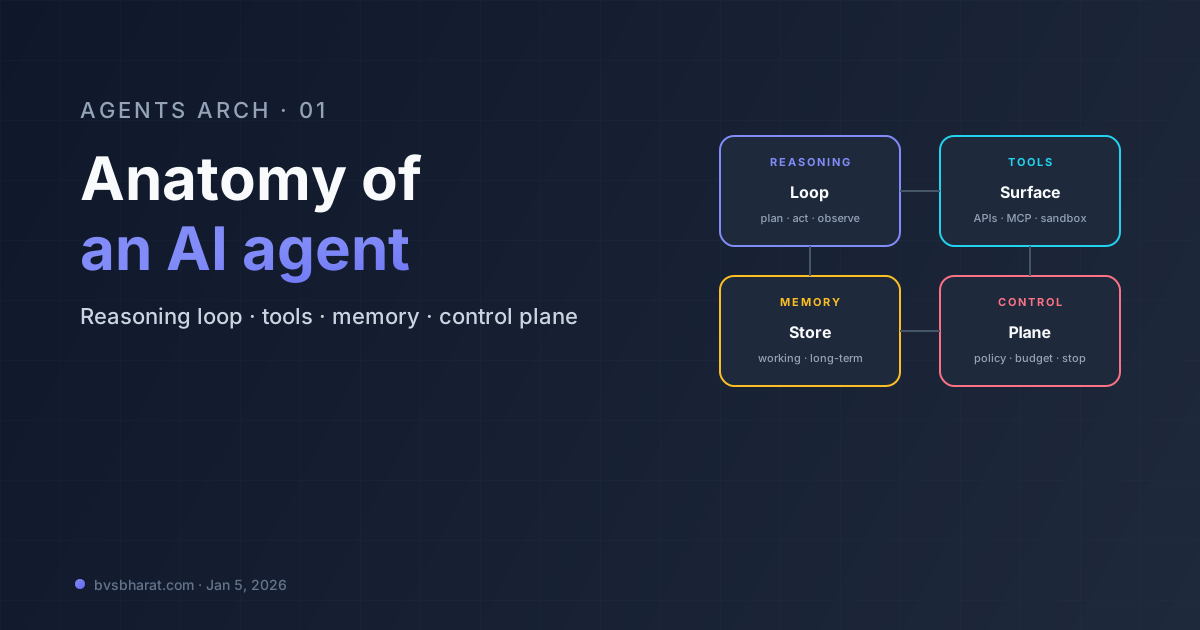
If you strip every framework brochure down to its load-bearing parts, an AI agent is four moving pieces wrapped around an LLM: a reasoning loop, a tool layer, a memory store, and a control plane that decides when to stop. Everything else — orchestration, observability, governance — is built on top of that core.
This first post in the Agents Arch series lays out the anatomy that every later post (LangGraph, CrewAI, ADK, Managed Agents, reference architecture) will assume. If you’ve been gluing prompts to APIs and calling it “an agent,” this is the mental model that turns the duct tape into a system.
The reference shape
The arrows aren’t decoration. The reasoning loop pulls in context from memory and policy from the control plane on every iteration, decides what to do next, and either calls a tool, calls the LLM again, or stops. Observability captures the trace of every step so you can debug what the agent actually did vs. what you thought it did.
The reasoning loop
The loop is the heart of the agent. The canonical shape, popularized by the original ReAct paper and now baked into every framework, is think → act → observe → repeat:
state = initial_state(user_input)
for step in range(max_steps):
    thought = llm.plan(state)        # think
    if thought.is_final:
        return thought.answer
    observation = run_tool(thought)  # act + observe
    state = state.append(thought, observation)
raise BudgetExceeded()
That’s the entire idea. The framework wars are arguments about how the loop is expressed — LangGraph wraps it in a state graph, CrewAI hides it behind roles and tasks, ADK exposes it as workflow agents, and Claude Managed Agents runs it for you in a sandboxed container. The loop itself is identical.
Two design decisions inside the loop determine whether your agent is robust or a coin flip:
- What counts as “done” — a structured
is_finalflag the model emits, a heuristic on the last observation, or an explicit “answer” tool the agent must call. Implicit stop conditions (“the LLM stopped emitting tool calls”) are how you ship infinite loops to production. - What you re-pass to the model — the full history, a summarized history, only the last
ksteps, or a curated scratchpad. The choice trades off context cost, coherence, and the cliff where the model forgets what it was doing.
The tool layer
Tools are what turn a chatbot into an agent. Without them, the model can only emit text; with them, it can read state, mutate the world, and verify its own work. Each tool is three things: a schema the model can call, an implementation that runs the action, and a boundary that decides who can call it with what arguments.
A minimal tool definition, in the shape every modern framework uses:
@tool
def get_invoice(invoice_id: str) -> Invoice:
    """Look up an invoice by its ID. Returns amount, status, and customer."""
    return invoices_db.fetch(invoice_id)
The docstring is the contract the model reads. The signature is what the LLM provider’s function-calling API enforces. The body is yours. The interesting design question is not “how do I define a tool” — that’s solved — it’s what should be one tool vs. several.
Two failure modes pull in opposite directions:
- Too few, too general: one
run_sqltool with a free-text query lets the model do anything, including things it shouldn’t, and the schema gives no hints about what’s safe. - Too many, too narrow: 80 tools for every CRUD operation blow up the context window and confuse the model about which one to pick.
The 2026 default is scoped tool sets — load only the tools the current task needs, with clear, narrow signatures. MCP (Model Context Protocol), which crossed 97 million downloads in 2026 and is now the de facto standard, makes this easy: connect to an MCP server, expose its tools, scope them per agent. We’ll go deep on this in Post 9.
Memory
There are three kinds of agent memory, and conflating them is the most common source of bugs:
| Kind | Lifespan | Purpose | Storage |
|---|---|---|---|
| Working | One turn | Scratchpad inside the loop | In-process |
| Session | One conversation | What we said and did this run | Checkpoint store (Postgres, Redis) |
| Long-term | Forever | User preferences, prior decisions, learned facts | Vector + KV + graph |
Working memory is just variables. Session memory is what LangGraph’s MemorySaver / PostgresSaver manage — it lets you resume an interrupted agent run exactly where it stopped. Long-term memory is the hard one: it has to survive across sessions, retrieve the right snippet at the right time, and update when the world changes. The state-of-the-art in mid-2026 is hybrid retrieval (vector + BM25 + graph), and the unsolved problem is staleness — agents can’t tell when stored memories no longer reflect reality. We’ll dedicate Post 8 to memory architectures.
The control plane
The control plane is the part nobody talks about until production breaks. Its job is to decide, on every loop iteration, whether the agent should keep going. It’s where you encode the boring but vital constraints:
- Budget: max steps, max tokens, max wall-clock time
- Safety: which tools can be called, with what arg patterns, by which user
- Policy: rate limits, redaction rules, output schemas
- Recovery: what to do when a tool fails (retry, escalate, ask the human)
In a small agent, the control plane is if step > 10: break. In a production agent it’s a separate component — sometimes called the manager agent (CrewAI), supervisor node (LangGraph), runtime (ADK), or managed runtime (Claude Managed Agents). It’s also where human-in-the-loop lives. The control plane is what pauses the agent before a destructive action and waits for an approver.
Observability is not optional
If you can’t replay what the agent did, step by step, you can’t debug it. The default in 2026 is to emit a structured trace for every loop iteration: thought, tool call, tool result, latency, token count, cost. LangSmith, Langfuse, AgentOps, and the new wave of “agent observability” platforms all read the same shape. The shape matters more than the vendor.
A trace entry that’s worth its bytes looks like this:
{
  "step": 4,
  "agent": "invoice-resolver",
  "session_id": "s_8c1f...",
  "thought": "Customer reported a duplicate charge. Looking up both invoices.",
  "tool": "get_invoice",
  "args": {"invoice_id": "INV-2026-0042"},
  "result_preview": "{amount: 240.00, status: paid, ...}",
  "tokens_in": 1842,
  "tokens_out": 67,
  "latency_ms": 412,
  "cost_usd": 0.0084
}
Aggregating those entries gives you the metrics you actually want: cost per task, p95 latency by tool, error rate by step number, and the trace for the one user who complained.
The boundary between agent and product
The last piece of anatomy is the surface where the agent meets your product. Three patterns dominate in 2026:
- Foreground agent — user chats, agent responds; latency matters, sessions are short.
- Background agent — kicked off by a trigger (webhook, schedule), runs for minutes to hours, writes results to a system of record.
- Embedded agent — invoked by another system (a workflow, another agent, a UI action) with a structured input and output; behaves more like a function call than a conversation.
Most teams build the foreground one first and discover that the background and embedded patterns are where the actual business value lives. Plan for all three.
What’s next in this series
This is the map. Over the next twenty Mondays we’ll walk the territory:
- Jan 12 — LangChain in production: composition, callbacks, and the parts that survived the LangGraph era.
- Jan 19 + 26 — LangGraph deep dive: state graphs, reducers, checkpointers, cycles, branches, human-in-the-loop.
- Feb — CrewAI roles, Google ADK, Managed Agents, agent memory.
- March — tool patterns, multi-agent comms (A2A + MCP), RAG, observability, eval.
- April — deploy, cost/latency, security, governance.
- May — hierarchical systems, framework comparison, a full reference architecture, and where things are headed.
The goal isn’t tutorials. It’s the architecture you wish someone had drawn for you the first time you tried to ship one of these.